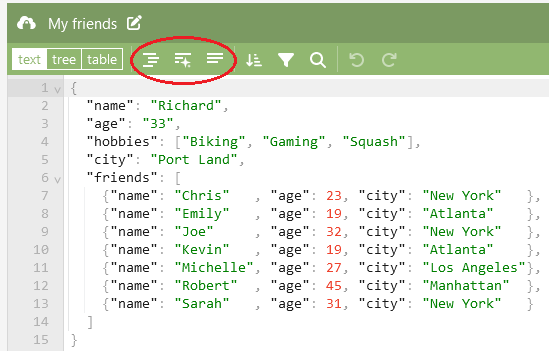
It’s 11 PM. A webhook is failing in production, and the payload in your logs is one unbroken line of 5,000 characters. Somewhere in there, a comma is missing or a bracket is unclosed. Your parser says Unexpected token and a position number, which is about as helpful as a street number with no street name.
You could count braces by eye. You could also paste it into a JSON formatter and see the problem in two seconds.
That’s the whole pitch. A formatter takes JSON that machines are happy with and humans can’t read, and turns it into something you can scan. A good one also tells you where the syntax breaks. This guide covers how formatting works, the errors you’ll actually hit, which tool to use when, and a security habit that’s easy to forget when you’re in a hurry.
What a JSON formatter actually does
Four jobs, usually in one click:
- Beautifying. Adds line breaks and indentation so nested objects line up and you can see the structure.
- Validating. Checks that the text is legal JSON and points at the first thing that isn’t.
- Visualizing hierarchy. Many tools show a collapsible tree, so you can fold away a 400-item array and look at the keys around it.
- Minifying. The reverse trip. It strips whitespace to shrink a payload before you send or store it.
Here’s the same data both ways.
Minified:
json
{"id":42,"user":{"name":"Sam","roles":["admin","editor"]},"active":true,"score":null}Formatted:
json
{
  "id": 42,
  "user": {
    "name": "Sam",
    "roles": [
      "admin",
      "editor"
    ]
  },
  "active": true,
  "score": null
}
Same data. One of them you can review in a pull request.
Why raw JSON breaks
JSON is strict. It looks like JavaScript object syntax, so people write it like JavaScript, and that’s where trouble starts. The rules are short:
- Keys and strings use double quotes only.
- No trailing commas.
- No comments.
- Values can be strings, numbers, booleans,
null, arrays, or objects. Notundefined, notNaN, not functions.
Break any one of those and a strict parser rejects the whole document. That’s why one stray character can take down an entire request: there’s no partial credit.
Common errors and fixes
| Error | Bad example | Fix |
|---|---|---|
| Trailing comma | {"a": 1,} | Remove the comma after the last item |
| Single quotes | {'a': 'b'} | Use double quotes: {"a": "b"} |
| Unquoted key | {a: 1} | Quote it: {"a": 1} |
| Unescaped quote in string | {"msg": "He said "hi""} | Escape: "He said \"hi\"" |
| Missing closing bracket | {"a": [1, 2} | Close the array: {"a": [1, 2]} |
| Comments | {"a": 1} // note | Remove them; JSON doesn’t allow comments |
undefined or NaN | {"a": undefined} | Use null, or leave the key out |
| HTML instead of JSON | <!DOCTYPE html>... | Check the URL, status code, and auth; you probably got an error page |
| Leading BOM or junk | Invisible character before { | Strip it before parsing |
That last-but-one row is worth remembering. If your parser complains about Unexpected token <, the “JSON” is almost always an HTML error page. The formatter isn’t the fix. The request is.
How JSON formatting works under the hood
There’s no magic. A formatter does three things:
- Parse the text into an in-memory structure. If the text is invalid, parsing fails here, and that failure is your validation error.
- Walk the structure.
- Serialize it back to text with indentation.
In JavaScript, that’s two calls:
javascript
const data = JSON.parse(rawText);
const pretty = JSON.stringify(data, null, 2);
console.log(pretty);
The 2 is the indent width. Use "\t" if you prefer tabs.
Always wrap JSON.parse in a try/catch when the input comes from outside your control:
javascript
function safeParse(text) {
  try {
    return { ok: true, data: JSON.parse(text) };
  } catch (err) {
    return { ok: false, error: err.message };
  }
}
Python does the same job:
python
import json

with open("payload.json") as f:
    data = json.load(f)

print(json.dumps(data, indent=2, ensure_ascii=False))
Two gotchas from the parse-and-reprint approach
Because formatters re-serialize, they can change your data in subtle ways:
- Large numbers lose precision. JavaScript stores numbers as 64-bit floats, so integers above 2^53 (about 9 quadrillion) can come back altered. If you handle big IDs, keep them as strings in the payload, or use a tool that preserves the original text.
- Duplicate keys collapse. If an object has the same key twice, most parsers keep the last one and silently drop the other.
If a formatted copy looks different from the original in a way that matters, this is usually why.
Real-world workflows: which tool, when
The command line with jq
For anything repeatable, jq is the one to learn. It formats, validates, filters, and reshapes JSON.
bash
# Pretty-print a file
jq . payload.json

# Format a live API response
curl -s https://api.example.com/items | jq .

# Just validate (no output if valid, error if not)
jq empty payload.json

# Minify
jq -c . payload.json

# Pull specific fields out of an array
jq '.results[] | {domain: .domain, rating: .metrics.rating}' payload.json
(The field names in that last example are illustrative. Use your own API’s schema.)
Python’s built-in tool also works when jq isn’t installed:
bash
python3 -m json.tool payload.jsonBrowser dev tools
In Chrome or Firefox, open the Network tab, click a request, and use the Preview or Response view. You get a collapsible tree for free, with no pasting anywhere. In the console, copy(JSON.stringify(obj, null, 2)) puts a formatted version on your clipboard.
Online formatters
When you need to format JSON online, quickly, from a one-off blob, a web-based online JSON validator is fine. They shine for visual tree views, side-by-side diffs, and sharing a cleaned-up snippet with a colleague. They’re the wrong choice for anything sensitive (more on that below).
Your editor
VS Code formats JSON natively (Format Document), and many editors offer a JSON lint and format step through built-in language support or extensions. If you edit JSON config files daily, wiring this up once saves a lot of squinting.
| Situation | Best tool |
|---|---|
| Debugging a live API call | curl + jq or browser dev tools |
| Validating files in CI | jq empty or a schema validator |
| Quick one-off, non-sensitive snippet | Online JSON beautifier |
| Editing config files | Your code editor |
| Extracting fields from big responses | jq |
How data-heavy teams parse bulk JSON
Agencies and platforms that do SEO at volume spend most of their engineering time on one unglamorous task: turning large, nested API responses into clean rows.
Picture an operation like the one behind linksbuilderhub.com. It might query several third-party SEO data providers for domain metrics, backlink lists, and anchor text distributions. Each response is nested JSON, often paginated, sometimes with fields that are missing or null for obscure domains. A sensible pipeline for that looks like:
- Fetch and store the raw response untouched, so you can replay it if parsing logic changes.
- Validate the shape before trusting it. A schema check (JSON Schema, or a typed model) catches a changed field name before it corrupts a report.
- Extract only the fields you need, with defaults for missing ones.
- Normalize into flat rows for a database or spreadsheet.
- Log failures with the offending payload, so debugging means opening a formatted file, not guessing.
That’s how you parse JSON from an API reliably at scale: assume nothing about the response, and make every failure easy to inspect. Formatting tools are the last-mile helper in that chain, the thing you reach for when a single record doesn’t parse and you need to see why.
This is a general pattern for data-driven marketing teams, not a description of any specific company’s internal code.
Security: be careful what you paste
This is the part people skip.
When you paste text into a random web formatter, you don’t always know where it goes. Some tools process everything in your browser. Others send your input to a server. If your JSON contains API keys, bearer tokens, session cookies, customer emails, or any personal data, you’ve just handed it to a third party.
Habits worth building:
- Never paste production secrets or PII into an online tool you haven’t vetted. That includes “just this once, it’s quick.”
- Check where processing happens. A tool that says it’s client-side should work with your network disconnected. You can also open the browser’s Network tab, paste something harmless, and see whether a request goes out.
- Prefer local tools for sensitive data:
jq,python3 -m json.tool, or your editor. - Redact first. Replace tokens and personal fields with placeholders before sharing a payload in a ticket or chat.
- Rotate anything exposed. If a real key did land in a public formatter, treat it as compromised.
Convenience is not worth a leaked credential.
Keeping JSON clean across staging and production
A few habits that save real time:
- Validate at the boundary. Parse and check every external payload the moment it arrives, not three functions later.
- Format on commit. Run a formatter or linter in pre-commit hooks so diffs show real changes, not whitespace noise.
- Keep a library of real payloads. Save formatted samples of both good and bad responses, and use them in tests.
- Use the same parser settings everywhere. Differences between staging and production often come from different libraries handling edge cases (big numbers, duplicate keys) differently.
- Log raw payloads on failure, with secrets stripped, so you can reproduce the bug.
A JSON formatter won’t fix a broken API. But it turns “something is wrong somewhere” into “line 214, a missing comma,” which is most of the battle.
Pingback: Pomodoro Timer: 25-Minute Sprints to Beat Burnout