Every site I’ve audited in the last four years has had at least one canonical problem that nobody on the team knew about. That’s the part that still surprises me. Not that mistakes happen — of course they do. It’s that the damage is always silent.
There’s no error email. No red banner in Search Console. You check rankings one Tuesday, notice a page that used to sit at position 3 has dropped to position 14, and the traffic chart bends downward like a crack in a windshield. Meanwhile the “duplicate content” label hasn’t shown up in your coverage report for months. Nothing says “canonical.” You just slowly lose.
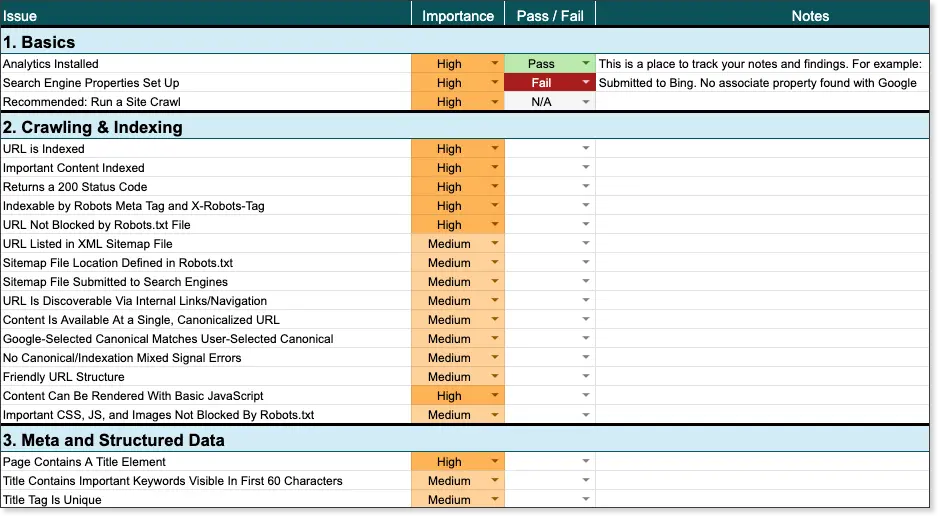
So let me save you the expensive part. This is a canonical tag audit checklist — 22 checks, ordered the way you should actually run them. Not theory. These are the ones that catch the problems responsible for the majority of ranking losses I’ve traced back to canonicalization.
Table of Contents
- [What a canonical tag actually does](#what)
- [Canonical vs. redirect vs. robots.txt](#comparison)
- [How to run the audit](#how-to-run)
- [The 22-point canonical tag audit checklist](#checklist)
- [Tool setup](#tools)
- [Prioritization framework](#priority)
- [Common failure patterns](#patterns)
- [Ongoing maintenance](#maintenance)
1. What a Canonical Tag Actually Does
The canonical tag is a <link> element in the <head> of an HTML document that tells search engines which URL is the primary version of a page when multiple URLs serve the same or near-same content.
htmlPreviewOpenCopyDownload
<link rel="canonical" href="https://yoursite.com/preferred-page" />
That’s the entire concept. One tag, one target URL.
The mechanics
When Googlebot crawls a URL, it does three things in sequence:
Step 1 — It fetches the page. If the canonical target returns a 5XX error, the crawl effectively collapses. Google can’t confirm the preferred URL exists, so the original page may get dropped or devalued. This is why a broken canonical target can quietly remove a page from the index entirely.
Step 2 — It reads the canonical tag. If present, that URL becomes the “preferred version” candidate.
Step 3 — It cross-checks. Google compares the canonical against other signals: does the page content actually match? Do internal links point here? Do external links point here? Does hreflang agree? If the tag conflicts with everything else, Google is entitled to ignore it.
What a canonical tag is NOT
This is where most of the damage comes from, so let me be blunt:
| Common belief | Reality |
|---|---|
| “Google always obeys my canonical” | It’s a hint. Google ignores it when it contradicts other signals. |
| “Canonical tags pass link equity” | They don’t. Use a 301 redirect for permanent moves. |
| “Canonical tags hide pages from users” | They don’t. Users still see the URL. |
| “Adding a canonical fixes thin content” | It doesn’t. Thin pages stay thin. |
| “One canonical per site is enough” | Every indexable page needs its own. |
That last one matters more than people expect. A site with a correct homepage canonical and 2,000 pages with no canonicals at all is broken in a way that’s hard to spot from the outside.
Why this suddenly matters more
Google’s March 2024 core update was the point where messy canonicalization started showing up as a distinct ranking pattern rather than just noise. Sites with conflicting canonical signals — especially ones pointing to redirected or redirected-to URLs — saw impression drops in the 30–60% range with no other visible cause.
The reason is straightforward. Conflicting canonical signals read as a trust problem. If a site can’t decide which URL represents its content, the assumption is either “this publisher is churning out variations” or “this publisher doesn’t have the site under control.” Both are trust signals. Neither is good.
The other thing people underestimate: canonical problems compound. One wrong tag is a rounding error. Four hundred of them split your authority across duplicate URLs, waste crawl budget on parameters nobody searched for, and blur the entity association of your brand. The result is a slow leak, which is exactly why it goes unnoticed for months.
2. Canonical vs. Redirect vs. Robots.txt
Before the checklist, get these three straight, because teams regularly use the wrong tool.
301 redirect → “This content has moved permanently.” It transfers ranking signals to the destination. Use it for migrations, URL changes, HTTP→HTTPS, www→non-www, deleted pages.
Canonical tag → “This content also exists at another URL, and this is the one I want ranked.” Use it for URL variations of the same page: parameter strings, pagination, print views, syndication copies.
robots.txt → “Don’t crawl this.” Note that noindex in robots.txt is a trap — Google can’t see the noindex if it can’t crawl the page. Use an X-Robots-Tag HTTP header or a meta robots tag instead.
The decision rule:
- Should users and crawlers land on URL A permanently? → 301 redirect to A
- Should URL B still be reachable but not compete? → canonical B → A, plus
noindexon B if you truly want it out of the index - Should the page not be crawled at all? → robots.txt disallow, or better, auth-gate it
A very common mistake: canonicalizing a redirected URL. If /old-page 301s to /new-page, and /old-page also carries <link rel="canonical" href="https://site.com/old-page">, you’ve built a loop. Google will eventually untangle it, but it takes weeks and the signal is muddy in the meantime.
3. How to Run the Audit
The whole process takes under two hours on a mid-sized site. Here’s the sequence I’d follow.
Step A — Crawl with JavaScript rendering ON
This is non-negotiable. A surprising number of sites inject canonicals client-side. If you crawl without JS rendering, you’ll report “missing canonical” on pages that actually have one, and you’ll chase a problem that doesn’t exist. Conversely, if your canonical is JS-injected late, you have a real problem.
Screaming Frog: Configuration → Crawl Configuration → Rendering → JavaScript → Crawl → All JavaScript. Sitebulb: Settings → Crawl Settings → Render JavaScript.
Step B — Export the canonical data
Export to CSV. You’ll want these columns at minimum:
- URL
- Canonical URL (as declared)
- Status Code
- Indexability
- Content Type
- Word Count
- Title
- H1
Step C — Cross-reference the canonical target
For every distinct canonical URL, check its HTTP status. This single step finds more real problems than any other.
bashOpenCopyDownload
# Extract unique canonicals and check status codes
cut -d',' -f2 canonicals.csv | sort -u > canonical_targets.txt

while read -r url; do
  code=$(curl -s -o /dev/null -w "%{http_code}" -L "$url")
  echo "$code  $url"
done < canonical_targets.txt
Step D — Manually spot-check 20 pages
Automated crawls find structural issues. Humans find logic issues — the case where the canonical points to the wrong page even though both are live and both return 200. No script catches that. You catch it.
4. The 22-Point Canonical Tag Audit Checklist
Run these top to bottom. Fixes early in the list often resolve issues later in it.
Check 1 — Every indexable page has exactly one canonical
How to check: Filter your crawl for pages with zero canonicals, and separately for pages with two or more.
Why it breaks: A page with no canonical hands the decision to Google, and Google’s guess is frequently wrong — especially when tracking parameters are involved. A page with two canonicals (one in HTML, one in an HTTP header, or two tags injected by different tools) produces non-deterministic behaviour. Google generally honours the first one it encounters, but which one that is depends on rendering timing.
How to fix: Enforce exactly one canonical in the CMS template. If a tag manager is injecting a second one, remove it.
The classic case: A developer hardcoded a canonical in the template. Six months later, marketing added GTM and configured a “Canonical Tag” variable with a default value. Every page on the site now has two. Search Console looks clean. Rankings quietly fragment.
Check 2 — Standalone pages canonicalize to themselves
How to check: Filter for pages where the declared canonical differs from the current URL.
How to fix:
htmlPreviewOpenCopyDownload
<link rel="canonical" href="https://yoursite.com/exact-current-url" />
Watch for: CMS or theme defaults that canonicalize every post to the homepage or the archive. More common than anyone admits. Check your top 20 posts by traffic manually.
Check 3 — Canonical URLs are absolute
How to check:
bashOpenCopyDownload
grep -rn 'rel="canonical"' . | grep 'href="/'
Why it breaks: Relative canonicals (/blog/post) resolve against the current document URL, which is fine until you have CDN routing, a subdirectory install, or a proxy rewriting paths. Then it resolves to something nobody intended.
The fix: Always full URL with protocol and host.
Check 4 — Canonical target returns 200
How to check: Bulk status check on every unique canonical target (script above).
Why it breaks: If the canonical target 404s or 500s, Google cannot confirm the preferred version exists. It may index the duplicate anyway, drop the page, or hold it in a “alternate canonical” limbo where it never ranks on its own merits.
The fix: Point the canonical at the final live URL. If that URL is gone, either restore it or repoint the canonical.
Check 5 — No redirect chains in the canonical path
How to check: curl -sIL "https://site.com/page" | grep -i "^location" — count the hops.
Why it breaks: Canonical → 301 → 301 → 200 wastes crawl budget and adds latency to every index decision. In my experience the canonical target should be exactly one hop from the canonical itself: zero.
The fix: Update canonicals to point at the final destination, not an intermediate.
Check 6 — Canonical and hreflang agree
How to check: Export hreflang annotations. Every language variant should have a self-referencing canonical, and each hreflang target should be the canonical version of that language.
The correct pattern:
htmlPreviewOpenCopyDownload
<!-- /en/page -->
<link rel="canonical" href="https://site.com/en/page" />
<link rel="alternate" hreflang="en" href="https://site.com/en/page" />
<link rel="alternate" hreflang="fr" href="https://site.com/fr/page" />

<!-- /fr/page -->
<link rel="canonical" href="https://site.com/fr/page" />
<link rel="alternate" hreflang="en" href="https://site.com/en/page" />
<link rel="alternate" hreflang="fr" href="https://site.com/fr/page" />
The failure: English page canonicalizes to the French page. Google’s international targeting collapses and both languages compete against each other.
Note: Always include x-default pointing to a language selector or your global version.
Check 7 — Paginated pages canonicalize to themselves
The old advice was wrong. Google recommended canonicalizing all pages in a series to page 1 for years. They reversed that in 2019. Each page in a paginated series should now canonicalize to itself.
htmlPreviewOpenCopyDownload
<!-- /category?page=2 -->
<link rel="canonical" href="https://site.com/category?page=2" />
The exception: If you have a genuine “View All” page that loads the full set and performs well, canonicalizing the series to it is reasonable.
Important: Google confirmed it no longer uses rel="next" and rel="prev" as indexing signals in 2019. Other engines still read them. Add them if you care about Bing.
Check 8 — HTTPS canonical everywhere
How to check: Filter canonicals containing http://.
Why it breaks: You’re declaring the insecure version preferred. Google prioritises HTTPS and will frequently override you, causing crawl waste and inconsistent signals.
The fix:
bashOpenCopyDownload
sed -i 's|rel="canonical" href="http://|rel="canonical" href="https://|g' *.html
Then verify at the CMS/database level, since templates are usually the real source.
Check 9 — Trailing slash policy is consistent
How to check: Find URLs where both /page and /page/ return 200.
Why it matters: Google treats them as distinct URLs. Two live versions, no canonical relationship, means split authority.
The fix: Pick one convention site-wide and enforce it with both canonical tags and 301s.
nginxOpenCopyDownload
# Normalize to no trailing slash
rewrite ^/(.+)/$ /$1 permanent;
Check 10 — www and non-www are consolidated
How to check: curl -sI https://www.site.com and curl -sI https://site.com. One should 301 to the other.
The fix: Choose the preferred host, redirect the other, and make sure every canonical uses the preferred host. Same for m. subdomains and any CDN hostnames.
Check 11 — Parameter URLs canonicalize to a clean base
How to check: List all URLs containing ? and inspect their canonicals.
The typical fix:
htmlPreviewOpenCopyDownload
<!-- /products?color=blue&size=large -->
<link rel="canonical" href="https://site.com/products" />
The exception that gets missed: If a parameter combination is a genuine landing page with unique content and converts — a size guide, a city-specific service page — it should canonicalize to itself and be indexed independently. Canonicalizing it to the base page throws away a ranking opportunity.
Also: Add rel="nofollow" on internal links to parameter URLs, or block them in robots.txt. That reduces crawl waste directly.
Check 12 — Session IDs and index parameters are handled
How to check: Look for ?sid=, ?session=, ?PHPSESSID=, ?jsessionid=.
The fix: Strip these at the server level. They should never reach the crawler.
nginxOpenCopyDownload
if ($arg_sid) { return 301 $scheme://$host$uri; }
Check 13 — Faceted navigation doesn’t explode the URL space
How to check: Count distinct URLs generated by filter combinations. A site with 4 filters and 8 options each can generate thousands of URLs from a single category page.
Why it breaks: Even with correct canonicals, Google still has to crawl those URLs to see the canonical tag. Crawl budget is finite.
The fix: Canonicals handle the indexing side. Robots and internal linking handle the crawl side. You need both.
Check 14 — Sorting and pagination parameters are canonicalized
How to check: ?sort=price, ?sort=price-asc, ?order=asc.
Why it breaks: Sort orders are functionally identical pages. Canonically they should all point to the clean base URL.
Check 15 — Pagination and sort don’t conflict
How to check: Look for ?page=2&sort=price. Combined parameters often break template logic and produce a canonical that points to a URL with the parameters still in it.
The fix: Strip the sort parameter in the canonical, keep the page parameter.
htmlPreviewOpenCopyDownload
<!-- /products?page=2&sort=price -->
<link rel="canonical" href="https://site.com/products?page=2" />
Check 16 — AMP and mobile canonicalization is correct (or AMP is gone)
How to check: If AMP is live, every AMP page should canonicalize to the desktop version, and the desktop page should carry rel="amphtml".
htmlPreviewOpenCopyDownload
<!-- AMP page -->
<link rel="canonical" href="https://site.com/article" />

<!-- Desktop page -->
<link rel="amphtml" href="https://site.com/article/amp" />
My recommendation: AMP adoption has collapsed. If you’re not actively maintaining it, deprecate it — 301 the AMP URLs to the canonical version and remove the amphtml tags. Carrying a broken AMP layer is a liability.
Check 17 — Cross-domain syndication is handled
How to check: If you publish on Medium, LinkedIn, Substack, or a partner site, each copy should canonicalize to the original on your domain.
htmlPreviewOpenCopyDownload
<!-- On the Medium copy -->
<link rel="canonical" href="https://yoursite.com/original-article" />
And on your site:
htmlPreviewOpenCopyDownload
<link rel="canonical" href="https://yoursite.com/original-article" />
Why it matters: Without it, Google picks one of the copies — usually the one with the most external links, which may not be yours. Cross-domain canonicals work, but only if both sides are live and 200.
Check 18 — No canonical on genuinely non-indexable pages, or a harmless one
How to check: Look at pages served with noindex in meta robots.
The nuance: A noindex page with a canonical pointing to another page is sending mixed signals — you want it out of the index and you want it to point elsewhere. Cleaner approach: use canonical only for duplicates you want ranked elsewhere, and use noindex (plus a robots.txt disallow for crawl control) for pages that shouldn’t rank at all.
The classic mistake here: putting noindex and a canonical pointing to the homepage on every paginated page. That tells Google “these pages don’t exist, and also everything is the homepage.”
Check 19 — Canonical targets are indexable themselves
How to check: For each canonical target, confirm it doesn’t have noindex in its meta robots.
Why it breaks: A canonical pointing to a noindex URL creates a dead end. Google is told to consolidate onto a page it can’t index.
The fix: Remove the noindex from the canonical target, or change the target.
Check 20 — Canonical is not pointing to a redirecting or soft-404 page
How to check: Look at canonical targets where the status is 200 but the page has near-zero word count, or matches a site’s “soft 404” pattern (search results page, empty category, login page).
Why it breaks: Google detects soft 404s separately from status codes. If your canonical target is a thin or empty page, you’ve effectively demoted your content into a non-ranking page.
The fix: Point the canonical at real, substantive content.
Check 21 — Canonical tags are present in the rendered HTML
How to check: Fetch the page with JavaScript execution and inspect the <head>. Use Search Console’s URL Inspection tool → View crawled page → the rendered tab.
Why it breaks: Google renders pages, but not always fully, and not on the first pass. A canonical injected after a 5-second timeout may never be seen.
The fix: Server-side render the canonical. If your setup is headless, ensure the canonical is present in the initial HTML payload — check the actual response body, not what the browser displays after hydration.
Check 22 — Canonicals survive template changes and deployments
How to check: This is a process check, not a crawl check.
The fix: Add canonical validation to your CI/CD pipeline or your post-deploy smoke test. If a deploy changes the canonical on 200 pages, you should know before Google does.
pythonOpenCopyDownload
import requests, re, sys
CANON = re.compile(r'<link[^>]+rel=["\']canonical["\'][^>]+href=["\']([^"\']+)', re.I)
bad = []
for url in open("urls.txt"):
    html = requests.get(url.strip(), timeout=10).text
    m = CANON.findall(html)
    if len(m) != 1 or m[0].rstrip("/") != url.strip().rstrip("/"):
        bad.append((url.strip(), m))
if bad:
    for u, m in bad:
        print("MISMATCH:", u, "->", m)
    sys.exit(1)
print("All canonicals valid.")
5. Tool Setup
| Tool | Best for | Notes |
|---|---|---|
| Screaming Frog | Deep technical audits | Best canonical filters; JS rendering slow |
| Sitebulb | Canonical-focused audits | Fastest canonical-specific reporting; cloud crawls |
| Ahrefs / Semrush Site Audit | Large-scale monitoring | Good for tracking canonical issues over time at scale |
| Google Search Console | Verifying what Google actually indexed | Page Indexing report is the ground truth |
| A custom script | Ongoing regression checks | Best for CI integration |
The combination I’d use: Screaming Frog for the initial deep crawl, Search Console to confirm what Google indexed, and a Python validation script running on every deployment.
If you’re running this for a client site or a large catalogue, the bulk validation is worth writing properly — linksbuilderhub.com has a similar script-driven approach for crawling and validating at scale, which is the difference between a one-off audit and continuous coverage.
6. Prioritization Framework
Found 400 issues? Don’t fix them in crawl order. Sort like this:
P0 — Fix today (indexing actively broken)
- Canonical target returns 404 or 5XX
- Canonical points to a redirecting URL
- Canonical points to a
noindexpage - Multiple canonicals on a single page
P1 — Fix this week (authority split)
- Missing canonicals on high-traffic pages
- Non-self-referencing canonicals on key templates
- http:// canonicals on an HTTPS site
- www/non-www split without redirect
P2 — Fix this month (crawl waste)
- Parameter URLs without canonicals
- Facet explosion
- Session IDs in the URL space
- Inconsistent trailing slashes
P3 — Fix this quarter (hygiene)
- AMP layers without maintenance
- Staging subdomains still indexed
- Legacy syndication copies without cross-domain canonicals
- CI validation not in place
P0 items typically account for the large majority of recovered traffic. Start there.
7. Common Failure Patterns
The staging subdomain leak
A staging environment is live at staging.site.com, indexed, and canonicalizes to the production page. Every page on staging is now a duplicate with a canonical pointing to prod. Not usually catastrophic, but it signals weak access control and confuses crawling. Block it with robots.txt and authentication.
The CMS default that canonicalizes everything to home
A theme update rolled out and the single post template lost its canonical logic. Every post on the site now canonicalizes to the homepage. Traffic from articles collapsed in a day, with no deployment error and no Search Console notification.
The tag manager collision
Already covered in Check 1, but worth repeating because it’s so common: a canonical in the template plus a canonical in GTM equals two canonicals, and only one of them is yours.
The parameter loop
A canonical includes a tracking parameter that the canonical itself strips. ?utm_source=... in the tag pointing to a URL that adds it back. Infinite loop, and Google gives up on the canonical entirely.
The migration leftover
HTTPS migration six months ago. Canonicals still point to old http:// URLs, which 301 to the new HTTPS ones. Google follows the chain, but the signal is ambiguous and there’s a two-hop penalty in crawling.
8. Ongoing Maintenance
An audit is a snapshot. Canonical health decays fast because it depends on templates, plugins, and deployment pipelines — all of which change constantly.
Do this:
- Re-crawl monthly. Canonical bugs appear on every release.
- Monitor in Search Console weekly. The Page Indexing report surfaces canonical problems faster than any third-party tool.
- Add CI validation. A canonical regression should fail the build, not the quarter.
- Review after every migration. URL changes, platform moves, and redesigns are where canonicals break.
- Document the policy. Write down your rules — HTTPS preferred, no trailing slash, clean base URL for parameters, self-referencing for standalone pages. Put it in your team’s SEO runbook.
The One-Page Version
If you need the quick version for a spreadsheet:
- One canonical per page
- Self-referencing on standalone pages
- Absolute URLs
- Target returns 200
- No redirect chains
- hreflang agrees
- Paginated pages self-referencing
- HTTPS everywhere
- Consistent trailing slash
- www consolidated
- Parameters → clean base
- Session IDs stripped
- Facets controlled
- Sort parameters canonicalized
- Pagination/sort conflict resolved
- AMP correct or removed
- Syndication cross-domain canonicals
- noindex and canonical not conflicting
- Canonical targets indexable
- No soft-404 targets
- Rendered in initial HTML
- Validated in CI
Final Word
Canonical tags Audit Checklist are the least glamorous part of technical SEO and arguably the highest-leverage. A single misconfigured tag on a template can cost more traffic than a year of content marketing. The audit itself isn’t hard — it’s a crawl, a CSV, and twenty minutes of judgement on the rows that look wrong. The hard part is that nothing breaks loudly, so you have to look on purpose.
Run the checks in order. Fix the P0s first. Then put validation in place so you never have to do this from scratch again.